My Progress in KDE NetworkManager
The past few weeks have been about turning my initial exploration of KDE NetworkManager into actual code.
I've been working on refactoring the VPN and other virtual connections, digging through the existing Plasma NM, NetworkManager, Qt, and its code to understand how everything fits together.
Why this needs doing
Plasma-NM is the part of Plasma that talks to NetworkManager. Most users encounter it through the network applet in the system tray, but the part I have been working on lives in the Connection Editor in System Settings—the place where you can add a Wi-Fi network, configure a static IP address, or set up a VPN.
The Connection Editor is built using Qt Widgets and .ui files, which follows a traditional Qt architecture. The .ui file describes the structure of the interface and is compiled by Qt's uic tool into C++ code. The resulting View owns and lays out the widgets that make up the interface, while the widgets handle user interaction and communicate with the underlying Model through methods and Qt's signal/slot mechanism.
Here is the flow chart for this
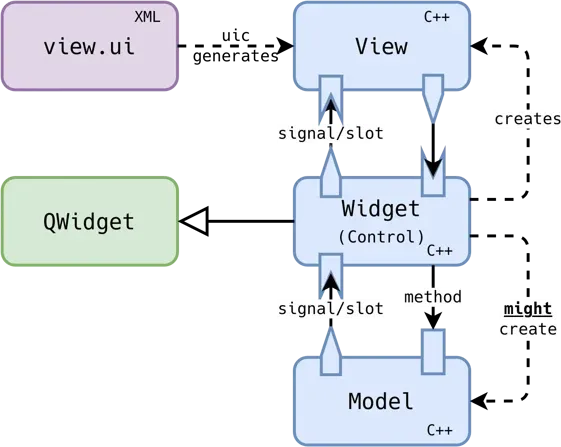
Image credit: Kevin Ottens
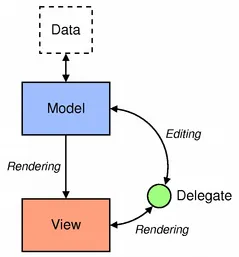
QML follows a somewhat different approach. Instead of the View directly owning and managing every UI widget, QML commonly uses a Model–View–Delegate architecture.
The Model provides the data that needs to be displayed. The View is responsible for displaying a collection of that data, while the Delegate defines how each individual item from the model should look and behave.
Now moving to the technical details of my implementation.
First and foremost, the folder structure. The current work lives in two places. A library holding the settings models and the QML views, and a KCM that ties them together:
  libs/editorqml/
  ├── settings/                    C++ models, one per settings group
  │   ├── generalSettings/
  │   ├── wificonnectionsettings/
  │   ├── wifisecurities/          Wi-Fi security and the shared 802.1x model
  │   ├── wiredconnectionsettings/
  │   ├── ipv4settings/
  │   ├── ipv6settings/
  │   └── vpn/
  │       ├── openvpn/  openconnect/  l2tp/  pptp/  sstp/  ssh/
  │       ├── vpnc/  strongswan/  libreswan/  iodine/  fortisslvpn/
  │       └── wireguard/
  └── qml/                         the views, mirroring settings/
      ├── components/              one page per connection type
      ├── generalSettings/
      ├── wificonnectionsettings/
      ├── wifisecurity/            plus authentication/ and its EAP methods
      ├── wiredconnectionsettings/
      ├── ipv4/  ipv6/
      └── vpn/<type>/

  kcms/kcm_connections_qml/
  ├── kcm.cpp / kcm.h              owns one instance of every settings model
  └── ui/main.qml                  the connection list and the editor panel
Both editors live in the same source tree, separated by a build flag.
Everything new is behind -DBUILD_EDITORQML=ON flag, which is off by default. The flag gates exactly two directories, libs/editorqml and kcms/kcm_connections_qml.
Here is the detailed refactoring for the WifiConnectionType.
Wi-Fi is the largest of the connection types, having six tabs: Status, General, Wi-Fi, Wi-Fi Security, IPv4, and IPv6.
The straightforward half
WifiSetting is the model behind the Wi-Fi tab: a QObject exposing the fields the form edits (ssid, mode, bssid, band, channel, macAddress, clonedMacAddress, mtu, hidden), with three methods doing all the talking to NetworkManager. loadConfig() reads a WirelessSetting into those properties, setting() writes them back as a QVariantMap, and isValid() says whether they could be saved.
The QML then never mentions NetworkManager at all:
QQC2.TextField {
    text: root.setting.ssid
    onTextEdited: root.setting.ssid = text
}
WifiSetting does more than just store data. It also exposes availableSsids, availableBssids, macAddresses, and channels, which are not part of the connection at all. They come from the wireless hardware and fill the drop-downs, so you can pick a network rather than typing an SSID. The channel list even changes with the selected band. Putting them on the same object means the QML gets a value and its choices from one place.
The half that is actually interesting
Wi-Fi Security is not one form. It is ten, and a single enum decides which one you see:
enum SecurityType {
    None, WepHex, WepPassphrase, Leap, DynamicWep,
    WpaPsk, WpaEap, SAE, Wpa3SuiteB192, OWE
};
In the widget version, this was a stack swapped by index. In QML, it is a combo box and sub-forms whose visibility is bound to the selection:
QQC2.ComboBox {
    currentIndex: root.wifiSetting.securityType
    onActivated: root.wifiSetting.securityType = currentIndex
}

WpaPersonal {
    visible: root.wifiSetting.securityType === WifiSecuritySetting.WpaPsk
          || root.wifiSetting.securityType === WifiSecuritySetting.SAE
}
Three of the ten (DynamicWep, WpaEap, Wpa3SuiteB192) have no fields of their own and hand the job to 802.1x, which is its own tree of seven EAP methods. This is where splitting the models paid off in a way I did not plan for.
802.1x is not a Wi-Fi thing; wired uses it too. Because Security8021xSetting is a plain QObject rather than a widget owned by a Wi-Fi tab, the wired editor binds to the same model and reuses the same seven QML files.
Validity forwards the same way, so the Save button ends up gated on an EAP form several levels down without anything in between knowing:
case WpaPsk:
    return NetworkManager::wpaPskIsValid(m_psk) || m_pskOption == AlwaysAsk;
case WpaEap:
    return m_8021xSetting->isValid();
Note the check comes from NetworkManagerQt rather than a regex written here, a rule I tried to keep throughout.
Wiring it together
The KCM is the piece that connects the two halves. kcm.cpp constructs one instance of every settings model and exposes each as a property:
Q_PROPERTY(WifiSetting *wifiSetting READ wifiSetting CONSTANT)
Q_PROPERTY(IPv4Settings *ipv4Settings READ ipv4Settings CONSTANT)
CONSTANT because the pointers never change. Only their contents do. That is what lets any QML file reach a model without being handed one:
PlasmaNMQ.WifiConnectionSettings {
    setting: kcm.wifiSetting
}
Loading a connection walks the models in one direction. Selecting a row calls loadConnectionSettings(), which hands the NetworkManager settings to each model's loadConfig() in turn, then fires requestSecrets() over D-Bus.
Secrets come back later and asynchronously, so a small hash maps a setting name to the model that wants it:
m_secretsHandlers = {
    {"802-11-wireless-security", [this](auto setting) {
        m_wifiSecurity->loadSecrets(...);
    }},
    {"vpn", ...},
};
Each model's setting() returns a QVariantMap, applyTypeSettings() assembles the ones the current connection type needs into an NMVariantMapMap, and that single map goes to the Handler, which is the only place D-Bus writes happen. The editor never talks to NetworkManager itself.
Two more signals are present. Every model emits validChanged, which the KCM aggregates into one connectionValid property that the Save button binds to, so a malformed key three levels down inside an EAP form greys out the button. The same signals mark the KCM dirty, which is what makes the Apply button light up.
Which page appears is decided by one property. kcm.connectionType comes straight from the connection, and a Loader switches on it:
switch (kcm.connectionType) {
case PlasmaNM.Enums.Wireless:  return wireless;
case PlasmaNM.Enums.Wired:     return wired;
case PlasmaNM.Enums.Vpn:       return vpn;
case PlasmaNM.Enums.WireGuard: return wireguard;
}
For VPNs, there is a second switch inside that one, based on the service type, which picks the right page from qml/vpn/. This nested lookup replaces the VpnUiPlugin mechanism, since the old contract returned a QWidget, which is incompatible with the QML-based approach.
What is left
The editor now covers Wi-Fi, wired, IPv4 and IPv6, all eleven VPN types, WireGuard, and importing and exporting VPN profiles. That is most of what a person meets day to day, but it is not everything the widget editor does.
Connection types still on widgets
Mobile broadband is the big one, and it is not just a settings page. Adding a GSM or CDMA connection runs a whole wizard that asks for the country, provider, and plan, backed by a provider database.
Then there are the virtual types: bond, bridge, VLAN, and team. These are the ones that let you build an interface out of other interfaces. DSL, Hotspot and the shared PPP settings are also in the list.
Flows around the editor
Creating a connection is in progress: the type chooser and per-type defaults work, and the Save button is now gated on real validation rather than a non-empty name, but it still needs finishing.
Export works for OpenVPN and vpnc, which is not a limitation of the port but of the plugins, since the other nine never implemented it. WireGuard import still needs its own path because it does not go through a VPN plugin like the others.
The dependency that is outside of the KCM
This is the part I had not expected. Finishing the QML editor does not mean the widget library can be deleted, because the widget editor is reachable from more than just the KCM.
libs/CMakeLists.txt has the core library linking to the editor library, not the other way around, which means Handler can open a ConnectionEditorDialog itself. That is how the applet raises the full editor for a WPA-Enterprise network it cannot join with a password alone, and kded links the same library for the secret-agent prompt. The pindialog, password dialog and secret agent from Kded also need refactoring.
So the port has a second half that has nothing to do with System Settings: those call sites need a QML equivalent before anything can be removed.
The finish line is deleting libs/editor, removing the widget KCM, and dropping the build flag, so that there is one editor again rather than two. Everything above is what stands between here and there.
Thanks, see you soon.